Unlock the 80% You’re Missing in Business Central Today

Typically, manufacturers go live on Business Central, set up Finance and Order Processing, and create standard reports. The implementation is considered done, the team is comfortable, and life moves on. A year later, that same configuration often remains the whole story about Optimization.

It’s an understandable pattern.

However, it also means most companies run only a fraction of the system they paid for.

The problems Business Central was built to solve—inventory you can’t trust, planning in someone’s head—continue quietly costing time.

And reporting that takes a day to assemble keeps wasting money, which impacts Optimization.
Optimization Chart within a Gear

The Usual Starting Point

When a new ERP goes live, the priority is almost always the same: don’t break the business. That means the initial scope tends to cover:

  • Finance — GL, AP, AR, bank reconciliation
  • Order Processing — sales orders, purchase orders, basic inventory transactions
  • A handful of reports — usually the ones that replaced whatever spreadsheet or legacy system reporting existed before

This is a completely reasonable place to start. It gets the business off the old system and onto the new one with minimal disruption. The problem is that it’s also where most companies stay, not because the rest of the system isn’t valuable, but because nobody circles back to ask what else it could be doing.

What’s Sitting Unused

Business Central includes a substantial amount of functionality that goes well beyond the transactional basics, and manufacturers in particular tend to leave a lot of it on the table:

  • Material Requirements Planning (MRP) for automated, demand-driven purchasing and production suggestions instead of manual reorder decisions
  • Warehouse management features like bin tracking, pick/put-away workflows, and directed warehousing beyond a flat inventory list
  • Project costing for tracking profitability on custom work, not just standard products
  • Quality and lot/serial tracking for traceability requirements that are often still being managed in a separate spreadsheet
  • Power BI integration and richer analytics that turn static reports into something the team actually explores
  • Workflow and approval automation to replace email chains for purchase approvals, credit holds, or change orders
  • Fixed asset management, budgeting, and dimensional reporting that give finance a much sharper view of the business than the standard chart of accounts alone

None of this is exotic or expensive add-on software, in most cases, it’s functionality you’ve already licensed and simply haven’t configured or adopted yet.

Why the Gap Persists

Utilization gaps aren’t usually a sign that a company doesn’t care about getting value from its software. They’re a natural byproduct of how implementations happen and how businesses evolve:

  • The go-live team moves on. The people who understood the project scope shift back to their day jobs, and system expansion stops being anyone’s explicit responsibility.
  • The business changes. New product lines, new customers, new compliance requirements, or new growth targets emerge after go-live, but nobody circles back to ask whether the system should change with them.
  • Nobody outside the vendor relationship knows what’s possible. Internal teams are, understandably, focused on running the business day to day. Knowing what Business Central could do for a specific new challenge isn’t really their job, it’s the kind of question a knowledgeable partner is built to answer.

Closing the Gap Starts With a Conversation

The good news is that closing this gap rarely requires a big-bang second implementation. It usually starts with a much simpler exercise: sitting down, reviewing what’s changed in the business lately, and asking where the current setup is falling short.

We run quarterly check-ins with our clients at Accent Software.

They are not sales tactics.

Instead, they are opportunities to discuss what’s changed in your operations.

Moreover, during these talks, Optimization can highlight how Business Central might pick up more load.

Sometimes that conversation surfaces a quick win.

In turn, it’s the start of a bigger project.

Either way, it keeps your system evolving alongside your business instead of quietly falling behind it.

If it’s been a while since anyone took a fresh look at how much of Business Central your team is actually using, that’s a conversation worth having. Reach out to Accent Software, we’re glad to help you find where the untapped value is sitting.
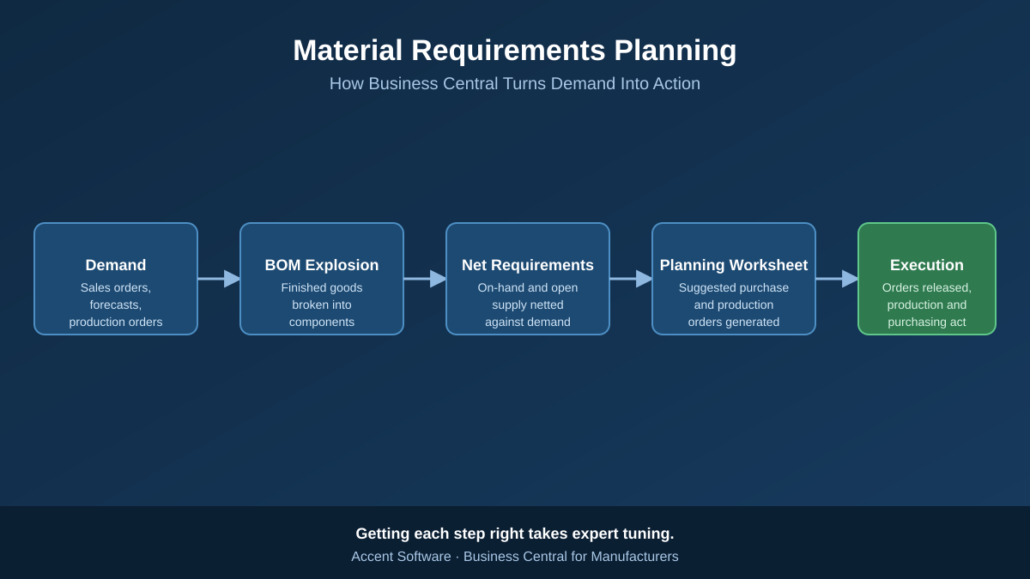

MRP in Business Central: A Guide to Smarter Inventory

If you run a manufacturing operation, you already know the tension: carry too much inventory and you tie up cash; carry too little and you risk stalling the production line waiting on a part. Material Requirements Planning (MRP) is the discipline and, within Business Central, the tool set that is designed to resolve that tension automatically. Translating what you need to sell into exactly what you need to buy and build, and when.

Material Requirements Planning (MRP) turns Demand into Action

This article walks through what MRP actually does, how Business Central puts it into practice, and why getting it configured correctly is one of the highest-leverage investments a manufacturer can make.

What MRP Is Actually Solving For

At its core, MRP answers three questions for every item you stock or produce:

  1. What do I need? (based on sales orders, forecasts, and production demand)
  2. When do I need it? (based on lead times and due dates)
  3. How much do I already have or already have coming? (based on on-hand inventory and open supply orders)

MRP takes those three inputs and calculates the gap, the net requirement, then recommends specific actions to close it: place a purchase order, release a production order, or reschedule something already in motion.

How Business Central Runs MRP

Business Central’s planning engine automates this calculation through a few connected pieces:

  • Bills of Materials (BOMs) define what components and sub-assemblies go into a finished item, so the system can “explode” demand for a finished good down through every level of its structure.
  • Demand sources — sales orders, forecasts, and inter-company or production demand, feed the engine what’s actually needed.
  • Item cards hold the planning parameters (reorder policy, lead time, safety stock, lot sizing) that tell the engine how to respond to a shortage.
  • The Planning Worksheet is where it all comes together. Running MRP (or the Calc. Regenerative Plan batch job) populates this worksheet with suggested purchase and production orders, along with reschedule and cancellation messages when existing supply no longer matches demand.
  • Action and exception messages flag when the plan changed, a due date moved, a quantity dropped, a new shortage appeared, so planners know exactly what to review rather than re-analyzing the entire schedule from scratch.

Done well, this turns planning from a spreadsheet-and-gut-feel exercise into a repeatable, auditable process that keeps pace with a changing order book.

Where MRP Configurations Commonly Go Wrong

MRP is powerful, but it’s also unforgiving of bad inputs. A few of the most common issues we see in the field:

  • Reorder policies set inconsistently across items, so some parts are planned with precision while others are essentially ignored by the engine.
  • Inaccurate lead times, which either trigger orders too late (causing shortages) or too early (inflating inventory).
  • Bloated or stale planning parameters, safety stock, minimum order quantities, and lot sizing rules that were set once and never revisited as demand patterns changed.
  • Planning worksheets full of noise, where hundreds of cancel/reschedule messages bury the handful that actually matter, and planners start ignoring the tool altogether.

None of these are flaws in Business Central itself, they’re the result of parameters that don’t reflect how the business actually operates. And that’s exactly the kind of gap that’s easy to miss from the inside, because it usually takes months of daily use to accumulate.

Why This Is Worth Getting Expert Eyes On

MRP configuration sits at the intersection of your item master data, your BOM structure, your production routings, and your actual buying and scheduling behavior. Tuning it correctly requires understanding both how Business Central’s planning engine makes decisions and how your specific production environment behaves, lead times, supplier reliability, changeover constraints, and seasonality all matter.

This is precisely the kind of work an experienced Business Central partner earns its keep on. At Accent Software, our team works exclusively with manufacturers, and MRP tuning is one of the most common, and most impactful, engagements we run: reviewing reorder policies item by item, correcting lead times against real supplier performance, and clearing a noisy planning worksheet down to the handful of exceptions that actually need a decision. The result is a planning process your team can trust, instead of one they work around.

If your planning worksheet has become something your team dreads opening, or you suspect Business Central’s MRP isn’t earning its keep the way it should, it’s worth a conversation. Reach out to Accent Software we’d be glad to take a look at how your environment is configured and show you where the quick wins are.

ERP Decision-making for manufacturers: Form a team
[Video]

Deciding which ERP solution to purchase can be a time-consuming process, but it's important to get it right.

Here are the people you'll want on your team.

First, appoint a project manager to oversee the whole process. They'll keep things on track.

Next, find an executive stakeholder to involve in the discussions. They'll make sure participants have the resources they need.

You'll also want representatives of the end-users to participate. They'll share critical insights and generate buy-in.

IT should have a prominent voice, too. They'll share technical knowledge and anticipate integration needs.

Check back here to learn more about how an ERP system can benefit your manufacturing operation.

Integrating payment processing with ERPs: Worth the strain?

One of the best ways to leverage your ERP is to centralize it for greater overall transparency. Ideally, this will lead to better-informed decision-making and stronger institutional performance.

In order to drive that centralization, integrating CRMs and other crucial applications with your ERP is important.

How about your payment processing software? Integration could be beneficial, but it's bound to bring some strain, too.

Is it worth the effort?

Is your payment processing system integrated with your ERP? Should it be?Is your payment processing system integrated with your ERP? Should it be?

Problem: Payment processing systems are targets for hackers

Payment processing systems handle a wealth of personal information that can be highly attractive to hackers, as we've seen time and again.

By selling personal information, including credit card numbers and other financial details, or by freezing these systems through the use of ransomware, cybercriminals can do a lot of damage with payment processing data.

Why it's worth it: Increase payment processing security during the process

The fact of the matter is that payment processing will always be a target for bad actors, regardless of whether your system is integrated or if it operates independently.

In fact, if you begin the process of deciding how to best integrate your payment processing system with your ERP, you start considering updating or changing your payment processing partner to something that's more compatible with your existing ERP. If this is the case, you can strongly prioritize cybersecurity during the decision-making process, helping you get a fresh start with a more robust system.

Problem: It costs money upfront

Integrating these two systems doesn't happen automatically. You may face costs associated with changing software vendors, upgrading your systems or replacing outdated hardware. If you don't already have the technical expertise on your team to take care of this endeavor, then you may need to hire outside support, too.

Why it's worth it: Long-term savings

There are two ways you stand to save money over time by integrating your ERP and payment processing systems:

  1. You'll save on labor costs because you'll eliminate manual re-entry of payment processing information into your accounting and inventory channels.
  2. You'll have enhanced visibility into your day-to-day financial operations, which means you'll handle your cash flow more efficiently.

Additional reasons to integrate

As an added advantage of integrating these two systems, by limiting manual data re-entry, you expose your data sets to less potential for human error, meaning you'll achieve greater accuracy and more consistent reporting across channels.

At Accent Software, we have experience supporting ERP implementations and integrations for clients in the manufacturing sector. Reach out today to find out how we can help.

The dangers of duplicates [Video]

A study from Experian found that 30% of organizations believe data duplication is one of their top three data quality errors.

Here's why you need to watch out for duplicate data.

First, there's the cost. Storing redundant data can add up quickly for your company.

Secondly, there's all the wasted time! Every moment you spend on unnecessary data entry is another moment that could have been spent on something better.

Duplicates also open up new opportunities for human error, and inaccurate data means you run the biggest risk of all: making poor business decisions because of bad information.

Get in touch with Accent Software today to find out how a properly installed ERP can keep you from wasting time and effort on duplicates.

Is an ERP migration to the cloud right for you in 2020?

At the end of the 2010s, cloud computing was certainly on the uptick. In fact, Gartner predicted recently that spending on worldwide public cloud services would grow 17.5% over the previous year.

If trends continue, the coming decade will see an influx of companies moving their on-prem solutions to the public cloud.

Is now the right time for an ERP migration that moves your legacy system to the sky?

Is 2020 the right year to start planning your ERP migration to the cloud?Is 2020 the right year to start planning your ERP migration to the cloud?

Benefits of the cloud

More than just keeping up with the Joneses, an ERP migration to the cloud can provide your organization with tangible benefits.

Continuous updates

Instead of being constrained by your on-prem resources, a cloud-based ERP solution gets continuous updates that improve functionality and quickly patch newly discovered vulnerabilities.

Shift the security burden

Cybersecurity is a major hurdle for some companies as they weigh the pros and cons of moving to a cloud-based solution. While there is inherent risk built into the migration, as long as you can verify whether your provider assumes responsibility for data security and protection, a cloud system could relieve you of that burden and actually be a huge upgrade.

Enhanced recovery

Migrating your ERP to the cloud could also improve your ERP's resiliency in disaster scenarios, assuming your provider is well-equipped to handle these situations. Hybrid on-premises and cloud solutions can help you further mitigate this risk.

What's the risk of an ERP migration?

First of all, the most obvious consideration: What do you do with your hardware? Once you move your ERP to the cloud, existing on-premises tech could be a drain, unless it's thoughtfully repurposed. As we mentioned above, this is an opportunity for you to add redundancy that improves security, or for you to warehouse old data you don't need in the cloud yet, but that you're not prepared to dump

Any ERP migration carries risk with it, as well as organizational strain. Without proper technological planning and change management strategies in place, you could experience some turbulence as you switch systems, and moving to the cloud does include some added complexity.

Carefully plan out your ERP migration. One of the first things you need to consider is how you'll frame this journey.

Is this an ERP migration to the cloud or a fresh start with SaaS?

It's a migration if:

Your current users are accurately maintaining the data in your ERP, and smooth processes ensure that you're deriving the greatest value possible out of your current setup. In this case, you'll map current processes onto the new system and encourage change where it needs to occur.

Consider yourself to be starting fresh if:

You need to implement process changes that enable your users to better understand the value of updated data and proper use of the ERP. In this situation, you may need to redesign processes for the cloud-based system from scratch while generating buy-in at your organization.

If your operation is considering migrating an ERP to the cloud this year, reach out to Accent Software to find out how we can help.

What is postmodern ERP?

Gartner first coined the term "postmodern ERP" in 2014 as an effort to describe how the ERP landscape had evolved up to that moment. Previously, the ERP existed as a single central software application housing a whole host of functions. As time passed, however, the technology grew and changed to become an overarching suite to which applications from outside parties connected and fed information.

Postmodern ERP: Integrating Administrative and Operational Components

Gartner categorizes ERP functions according to two strategies, which the postmodern ERP integrates: administrative and operational strategies.

The administrative strategy component is common to both manufacturers and service-oriented enterprises. Generally speaking, all companies require administrative functions from their ERP, like solutions that handle financial, HR and purchasing functions.

The operational component is often unique to supply chain functions required of manufacturers, logistics providers and other organizations that make, sell and transport tangible products.

Most businesses, especially newer ones, have unique needs that require specialized services to help them manage their administrative and operational functions. The postmodern ERP sits at the nexus point of these two domains, integrating separate applications produced, and perhaps maintained, by third parties, according to the enterprise's needs.

A postmodern ERP integrates operational and administrative ERP functions.A postmodern ERP integrates operational and administrative ERP functions.

Is a postmodern ERP right for me?

If the idea of moving your solution toward a postmodern ERP model sounds enticing to you, you may be looking for some guidance to determine if this is really the right choice for your enterprise. Here are three questions to consider on your road to that decision.

Are my current needs addressed by my traditionally configured ERP?

If you're still relying on independently created, ad hoc solutions like custom spreadsheets that don't connect with your ERP architecture to handle business-critical tasks unique to your industry, this could be a problem. If duplicate data or a lack of communication has produced organizational headaches, and the out-of-the-box solutions for your traditional ERP don't address your needs, a change could be in your future.

Are there third-party solutions available that better meet my unique needs?

A postmodern ERP configuration will be most attractive to you if you research and discover third-party applications that meet your needs and integrate with a postmodern ERP setup that you find suitable.

Am I paying for functions I don't use?

Even if you have to continue to subsist on your customized spreadsheets or other siloed software, if you're paying for ERP functions that you aren't using, and if you could save money by scaling back, that might be the right direction to go. It will give you added flexibility as your company matures, too. Just make sure to factor the change-over process into your cost-benefit analysis.

If you want further help making this decision and finding a partner who can help you update your ERP as needed, reach out to Accent Software to see how we can assist.

How do ERP and CRM systems work together?

The modern business world is complicated, and competition is fierce, so proactive organizational leaders can't afford to rely on ad hoc systems to manage their operations.

ERP and CRM systems are pivotal in today's operational environments. Both these solutions help enterprises share data smoothly among departments, facilitating greater collaboration and driving efficiency.

ERPs and CRMs might seem like they're similar at first glance. How do their functions overlap and diverge? How do they relate to each other, if at all? Is it better to combine these solutions under one house or use them separately?

ERP and CRM systems have similar functions. How do they work together?ERP and CRM systems have similar functions. How do they work together?

What are ERP and CRM?

Let's first take a look at each application individually to see what it does and who it's primary users are.

ERP

ERP stands for enterprise resource planning. What does that mean? It means that this software solution typically helps its users manage the flow of information for back-office functions. This means that it has a broad impact on operations in the factory and warehouse. It also interacts with procurement functions, and it can connect to payroll and HR, too.

CRM

CRM stands for customer relationship management software. As you might infer, this is more of a front-office solution, focused on sales, customer service and interactions with clients, prospects and leads. It may be connected to marketing efforts as well.

How are ERP and CRM systems connected?

There are several different ways that ERP and CRM systems can work together within an organization.

ERP with CRM capabilities included

Many large ERP systems include some CRM capabilities within their baseline functions. ERPs are generally intended to be comprehensive, so they may provide more functionality than their users actually leverage. Typically, the CRM features included within an ERP are limited in scope and can feel unwieldy for their end users.

ERP with CRM module added on

Like the previous formation, some ERPs offer CRM add-ons or modules on top of what's built into the ERP. These solutions are typically a bit easier for the end user, and they integrate readily with the associated ERP.

Separate ERP and CRM solutions

Some businesses use an entirely separate CRM purchased through a third party instead of through the company that manages their ERP. These standalone CRMs are typically geared toward sales and customer service end users, and integration with an existing ERP can be more difficult.

What are the benefits of integrating ERP and CRM systems?

Regardless of which setup you use, it's usually possible to integrate your ERP and CRM solutions.

The possibilities opened up by fully syncing these two systems will depend on your business. In the retail world, e-commerce operations may find these integration efforts particularly useful, since their costumers crave insight into the kind of data that's housed in ERPs.

No matter what you do though, a well-maintained CRM could enable you to anticipate demand better on the supply side and to manage customer expectations more accurately on the front end.

If you're looking for the ERP system that's right for you and your CRM, and you need a trusted partner to help you implement it, Accent Software is here to help.

How to secure your ERP [Video]

A recent survey found that 64% of ERP deployments have been breached in the last two years. Criminals target these platforms looking for sales data and personal information.

Here's how to protect your ERP from digital intruders.

First, make sure you frequently update your system to patch vulnerabilities.

Next, limit authorizations so each user only has access to what they need.

Verify that you have a secure ecosystem, too. Anything that's integrated with your ERP needs to be protected.

Lastly, follow good password policies across your enterprise, including multi-factor authentication when possible.

Check back here for more tips on implementing and maintaining an ERP at your organization.

Mobile ERP systems: What are the advantages?

The demand for enterprise resource planning (ERP) software is growing. A recent report from Technavio indicated that the ERP market will accelerate at a 9% compound annual growth rate over the next five years, with much of the expansion due to rising need in North American and increasing adoption among small and medium-sized enterprises.

For organizations that want to realize greater gains and efficiencies by purchasing and implementing a new ERP system, there are many options to consider, including whether they should go with a mobile ERP solution.

Since many ERPs are already based in the cloud and accessible online, you might already think of them as mobile ERPs. For our purposes, a mobile ERP is one that has prioritized mobile use in its features and interface. Accessing the ERP solely through a web browser is less likely to drive mobile adoption for users than a solution that emphasizes mobile experience.

Here's why a mobile ERP solution might make sense.

Mobile ERPs have some distinct advantages. Here are a few.Mobile ERPs have some distinct advantages. Here are a few.

Greater responsiveness

When an ERP solution is integrated with users' mobile devices, their ability to input data on the fly increases their responsiveness to enterprise functioning. When they carry a mobile device with them onto the shop floor, they can update business information as it happens instead of hours later, which also improves accuracy. Routine tasks are no longer separated from data input functions. These operations can now happen in sync, keeping ERPs regularly updated and making individual contributors more productive.

Better use of cloud ERP functionality

Though there are other ERP systems that also rely on cloud computing instead of onsite or third-party servers, mobile ERPs may make better use of their functionality. If workers use the mobile ERP interface in a responsive manner, making adjustments as changes occur, then there is less lag in connected workflows. Cascading actions occur with the help of the ERP more quickly because decisions, and responses, occur in real time.

Improved customer service

Mobile ERP enables greater transparency for customers, too. Depending on how the system is configured, the customer's view into company operations also benefits from the improved speed and accuracy that comes from on-the-go mobile updates. Customers who have greater insight into operations have expectations that are accurate, verifiable and easier to manage. Giving customers that direct insight into company activity also lessens the burden on customer service personnel, since there will be fewer questions for them to answer.

Streamlined interfaces

Paring down applications for mobile touch screens generally forces software designers to bring the most important user functions to the fore. Different ERP solutions will vary in how they prioritize user experience on mobile devices, so compare the functionality of different interfaces to determine which will suit your needs best. You should also consult with your software solution provider to see if they have any suggestions for what mobile ERP might work best for your needs, or if they're aware of any custom workarounds.

Accent Software can help you find the mobile ERP system that's right for you and integrate it with your systems in a way that meets your needs.