MRP in Business Central: A Guide to Smarter Inventory

If you run a manufacturing operation, you already know the tension: carry too much inventory and you tie up cash; carry too little and you risk stalling the production line waiting on a part. Material Requirements Planning (MRP) is the discipline and, within Business Central, the tool set that is designed to resolve that tension automatically. Translating what you need to sell into exactly what you need to buy and build, and when.
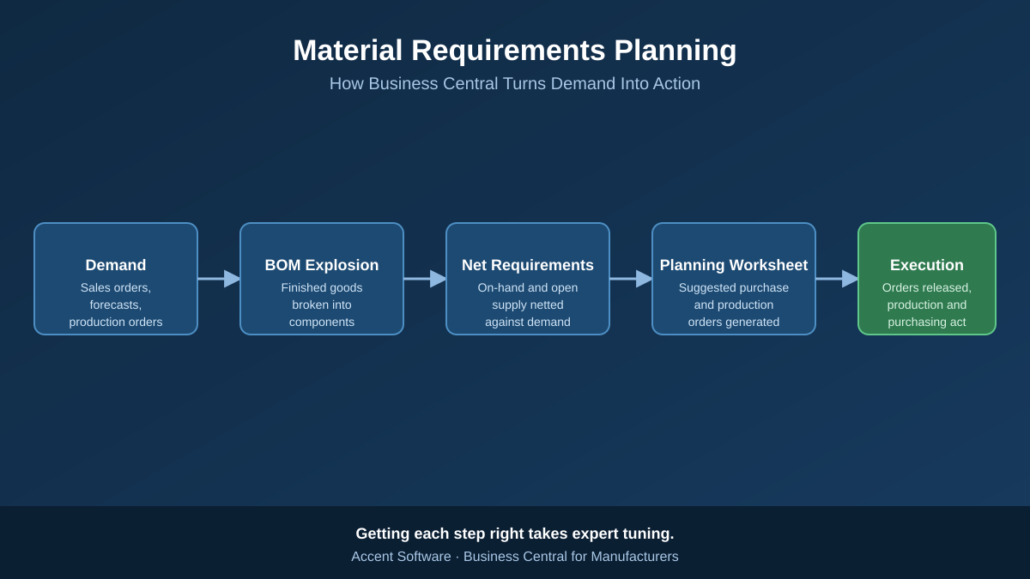
Material Requirements Planning (MRP) turns Demand into Action

This article walks through what MRP actually does, how Business Central puts it into practice, and why getting it configured correctly is one of the highest-leverage investments a manufacturer can make.

What MRP Is Actually Solving For

At its core, MRP answers three questions for every item you stock or produce:

  1. What do I need? (based on sales orders, forecasts, and production demand)
  2. When do I need it? (based on lead times and due dates)
  3. How much do I already have or already have coming? (based on on-hand inventory and open supply orders)

MRP takes those three inputs and calculates the gap, the net requirement, then recommends specific actions to close it: place a purchase order, release a production order, or reschedule something already in motion.

How Business Central Runs MRP

Business Central’s planning engine automates this calculation through a few connected pieces:

  • Bills of Materials (BOMs) define what components and sub-assemblies go into a finished item, so the system can “explode” demand for a finished good down through every level of its structure.
  • Demand sources — sales orders, forecasts, and inter-company or production demand, feed the engine what’s actually needed.
  • Item cards hold the planning parameters (reorder policy, lead time, safety stock, lot sizing) that tell the engine how to respond to a shortage.
  • The Planning Worksheet is where it all comes together. Running MRP (or the Calc. Regenerative Plan batch job) populates this worksheet with suggested purchase and production orders, along with reschedule and cancellation messages when existing supply no longer matches demand.
  • Action and exception messages flag when the plan changed, a due date moved, a quantity dropped, a new shortage appeared, so planners know exactly what to review rather than re-analyzing the entire schedule from scratch.

Done well, this turns planning from a spreadsheet-and-gut-feel exercise into a repeatable, auditable process that keeps pace with a changing order book.

Where MRP Configurations Commonly Go Wrong

MRP is powerful, but it’s also unforgiving of bad inputs. A few of the most common issues we see in the field:

  • Reorder policies set inconsistently across items, so some parts are planned with precision while others are essentially ignored by the engine.
  • Inaccurate lead times, which either trigger orders too late (causing shortages) or too early (inflating inventory).
  • Bloated or stale planning parameters, safety stock, minimum order quantities, and lot sizing rules that were set once and never revisited as demand patterns changed.
  • Planning worksheets full of noise, where hundreds of cancel/reschedule messages bury the handful that actually matter, and planners start ignoring the tool altogether.

None of these are flaws in Business Central itself, they’re the result of parameters that don’t reflect how the business actually operates. And that’s exactly the kind of gap that’s easy to miss from the inside, because it usually takes months of daily use to accumulate.

Why This Is Worth Getting Expert Eyes On

MRP configuration sits at the intersection of your item master data, your BOM structure, your production routings, and your actual buying and scheduling behavior. Tuning it correctly requires understanding both how Business Central’s planning engine makes decisions and how your specific production environment behaves, lead times, supplier reliability, changeover constraints, and seasonality all matter.

This is precisely the kind of work an experienced Business Central partner earns its keep on. At Accent Software, our team works exclusively with manufacturers, and MRP tuning is one of the most common, and most impactful, engagements we run: reviewing reorder policies item by item, correcting lead times against real supplier performance, and clearing a noisy planning worksheet down to the handful of exceptions that actually need a decision. The result is a planning process your team can trust, instead of one they work around.

If your planning worksheet has become something your team dreads opening, or you suspect Business Central’s MRP isn’t earning its keep the way it should, it’s worth a conversation. Reach out to Accent Software we’d be glad to take a look at how your environment is configured and show you where the quick wins are.

The Hershey ERP case study continues

Why ERP technology is the key to continuous improvement in manufacturing

How the right ERP technology can help manufacturers succeed in 2019

4 production scheduling features every manufacturing ERP should have


Production scheduling is among the most important components of the manufacturing process. For this reason, firms embarking on the enterprise resource planning implementation journey often devote considerable time to assessing the production scheduling capabilities of potential solutions. This is often easier said than done, as this particular shop floor function encompasses numerous operational variables, from asset maintenance to human capital management.

However, adopters in the manufacturing sector are not doomed to wade through extensive ERP documentation looking for elements that might support production scheduling. There are some must-have platform features that have been proven to bolster this essential activity.

Here are four of those salient ERP features:

Scheduling
The scheduling module is essential to production planning success. While most ERP solutions come equipped with these mission-critical components, functionality varies. As a result, firms should pinpoint platforms with particularly robust scheduling components – most notably, those that facilitate backward and forward shop floor planning, according to IT Toolbox. This functionality allows operational stakeholders to define start and completion times, and develop reliable projections from both ends.

Material requirement planning
This feature enables shop floor leaders to assess the supply and demand for inventoried assets of all kinds using recorded and forecasted sales figures. This information is critically important to personnel involved in production scheduling, which makes MRP an essential ERP feature for modern manufacturing organizations, ERP Focus reported.

Business intelligence
Business intelligence adoption is strong in the manufacturing arena, where around 30 percent of companies have data collection and analysis tools of some kind in place, according to research from Dresner Advisory Services published in Forbes. Production scheduling is among the many functional areas that these innovative solutions support.

With this in mind, manufacturing firms navigating the ERP implementation process should search for platforms that either offer built-in business intelligence tools or integrate with industry-standard third-party options, according to ERP Focus.

Routing
Sequencing is absolutely critical to production scheduling success. Stakeholders at every step in the supply chain must be able to coordinate their respective activities in a manner that keeps the entire organization moving.

Routing components support this sort of large-scale planning, giving personnel in every department the top-down transparency they need to collaborate and ultimately facilitate success, IT Toolbox reported.

Is your organization on the hunt for an ERP solution with these key production scheduling features? Consider connecting with Accent Software.

As a certified Microsoft Business Solutions partner, we provide vendor-vetted Microsoft Dynamics NAV implementation services, which allow companies across all sectors to adopt quality ERP software designed to facilitate optimal production scheduling practices.

Contact us today to learn more about our products and services.

How quality ERP technology can improve inventory control operations


Inventory control is among the most pressing matters for businesses across all sectors – and for good reason. Both overstocking and understocking can create significant issues that hamstring shop floor operations and drag down the bottom line.

Countless organizations have begun investing in internet of things devices and other advanced technologies in an effort to streamline inventory control processes and reduce the likelihood of stocking mishaps. For instance, an estimated 80 percent of retail companies purchased so-called visibility platforms in 2018 to bolster their stocking strategies, the International Data Corporation found.

While these new tools can certainly make an impact, one long-standing tool that can support inventory management optimization at scale is an enterprise resource planning solution.

The original visibility platform, the ERP system gives enterprises the power to take control of their warehouses and implement inventory management strategies that both lay the groundwork for significant cost savings and facilitate the responsive stocking methodologies needed to keep production moving and customers happy.

Here are some of the ways ERP technology can improve inventory control operations:

Real-time inventory tracking
Inventory monitoring is a major problem for many companies, especially for those that attempt to use antiquated processes to track items spread across multiple sites. This ineffective strategy often leaves organizational stakeholders blind to the actual state of the stockroom.

ERP platforms, on the other hand, allow inventory management teams to track every consequential unit, from shop floor output to the spare parts used for maintenance operations, in real-time, according to IT Toolbox.

In-the-moment stockroom control
Businesses without up-to-the-minute insight into their inventories are often slow to identify and address stocking trends that damage the bottom line. Conversely, those with access to ERP technology can view outbound and inbound shipments as they progress through the supply chain, pinpoint potential inventory control issues and make adjustments to avoid financial repercussions, ERP Focus reported.

With this technology in place, enterprises do not have to wait for quarterly reports to make money-saving inventory adjustments.

Operational improvement monitoring
Many modern companies are pursuing continuous improvement as part of larger lean operational methodologies. This sort of work requires consistent goal-setting, stringent tracking and on-the-ground adherence. Unfortunately, it is all too easy to fall behind on these efforts as they relate to inventory management without a tool for overseeing improvement.

ERP platforms can facilitate such activities, allowing businesses to configure targets and track progress through automated data flows, according to IT Toolbox.

Together, the inventory management advantages that come with ERP implementation are too good to pass up.

Here at Accent Software, we help businesses reap these benefits. As a certified Microsoft Business Solutions partner, we provide vendor-vetted Microsoft Dynamics NAV implementation services, which allow companies across all sectors to adopt quality ERP software designed to bolster inventory operations.

Connect with us today to learn more about our products and services.

4 ways manufacturers can lay the groundwork for ERP implementation success


Success is not a certainty when it comes to enterprise resource planning implementation. In fact, approximately 28 percent of the organizations that pursued ERP implementation last year oversaw projects that ended in complete failure, according to research from Panorama Consulting Solutions.

Having said that, manufacturing firms can avoid this costly outcome by laying the groundwork for success through these four tried-and-true ERP adoption strategies:

1. Collect strong system requirements
Platform requirement collection is an essential component of the implementation process. Here, information technology specialists and other project stakeholders review operational workflows to determine salient system components.

Ideally, manufacturers engaged in this activity should not only consider existing administrative and shop floor practices but also take the opportunity to consider how new ERP technology might support process improvements, CIO reported.

Businesses that take this approach and select software that can grow with the organization often see the most return on investment – recipe for long-term success.

2. Pinpoint specialized solutions
Manufacturing firms have specialized operational needs that many one-size-fits-all ERP providers cannot meet. This is why implementation teams must seek out vendors that can not only deliver system functionalities made for the manufacturing space, but also understand how to effectively integrate new software into shop floor environments, according to CIO.

Firms that ignore this variable tend to put into place ill-fitting ERP software that reduces output and weighs down the bottom line.

3. Cultivate support in the C-suite
While on-the-ground ERP implementation teams have the biggest impact on project success, executives also play an important part. These business leaders can oil the skids for ERP adoption, leveraging their financial authority and organizational clout to help IT staff and project stakeholders from other departments overcome various internal obstacles, Manufacturing.net reported.

This assistance is critical for the vast majority of manufacturing firms experience some pushback during ERP installation. However, those that focus on engaging the C-suite often gain access to top-down solutions to such issues.

4. Train employees to manage change
ERP adoption can transform workplace culture, forcing employees at all levels of the operation to adjust how they approach their everyday tasks. While some professionals take this change in stride, others resist in an attempt to hang on to familiar workflows.

ERP implementation teams must account for both scenarios and roll out exhaustive training programs that not only help staff adjust to new operating methods but also provide guidance on system best practices, according to Deloitte.

By emphasizing change management through instruction, manufacturing firms can reduce internal resistance and get the most out of their ERP technology.

Manufacturers that leverage these ERP implementation best practices can set themselves up for sustainable success.

Accent Software can help manufacturing firms looking to transform their operations and find success via reliable ERP technology. As a certified Microsoft Business Solutions partner, we provide vendor-vetted Microsoft Dynamics NAV implementation services, which allow businesses in the manufacturing space to put into place best-in-class ERP software designed to facilitate organizational growth.

Connect with us today to learn more about our products and services.